
First Click vs Last Click
Understand how First Click and Last Click attribution credit your campaigns differently in the AnyTrack Campaign Report, why report totals stay the same when you switch models, and how top-, middle-, and bottom-of-funnel campaigns trade credit so you can judge each funnel stage with the model that fits it.
First Click credits a conversion to the first ad click in the visitor journey: the campaign that introduced the buyer. Last Click credits the most recent ad click before the conversion: the campaign that closed the sale. Both models count the same conversions and show the same totals. Only the credit moves between campaigns. You switch models in the Campaign Report. This page shows what changes when you switch and how to read the result.
The Two Models at a Glance
Section titled “The Two Models at a Glance”| First Click | Last Click | |
|---|---|---|
| Credits | The first ad click in the visitor journey | The last ad click before the conversion |
| Question it answers | Which campaign introduced this customer? | Which campaign closed this sale? |
| Tends to favor | Top-of-funnel (TOF) prospecting and creative testing campaigns | Middle-of-funnel (MOF) and bottom-of-funnel (BOF) remarketing campaigns |
Both models are click-based: views never earn credit, and organic, email, and direct visits never take it away. AnyTrack docs also call them First Ad Click and Last Ad Click. AnyTrack attributes a conversion to a campaign only when its ad clicks carry UTM parameters.
Switch Models in the Campaign Report
Section titled “Switch Models in the Campaign Report”- Open the Campaign Report.
- Click the Attribution dropdown at the top of the report.
- Select First Click or Last Click. The report updates instantly.
What Changes When You Switch
Section titled “What Changes When You Switch”Here is the same store and the same seven days under each model (campaign names redacted). The TOF and MOF tags in the names tell you the job of each campaign in the funnel. Watch the Purchase column as the model changes:
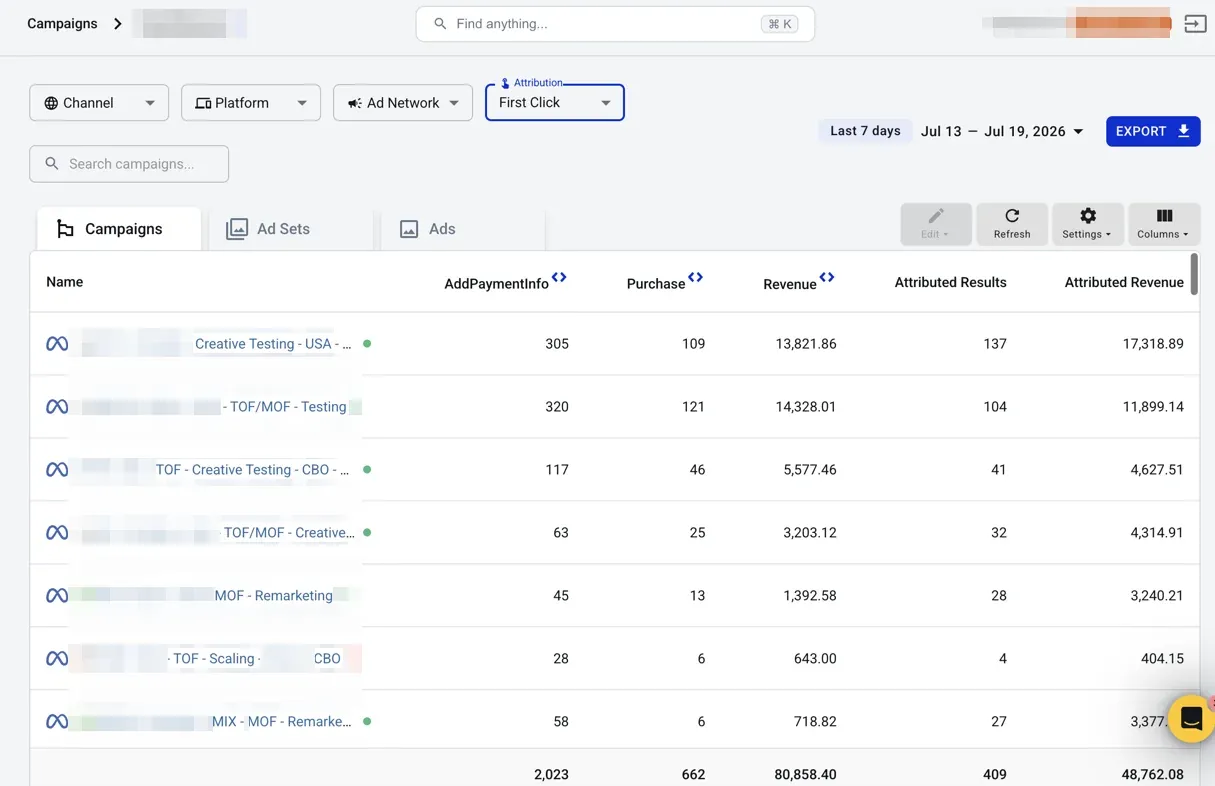
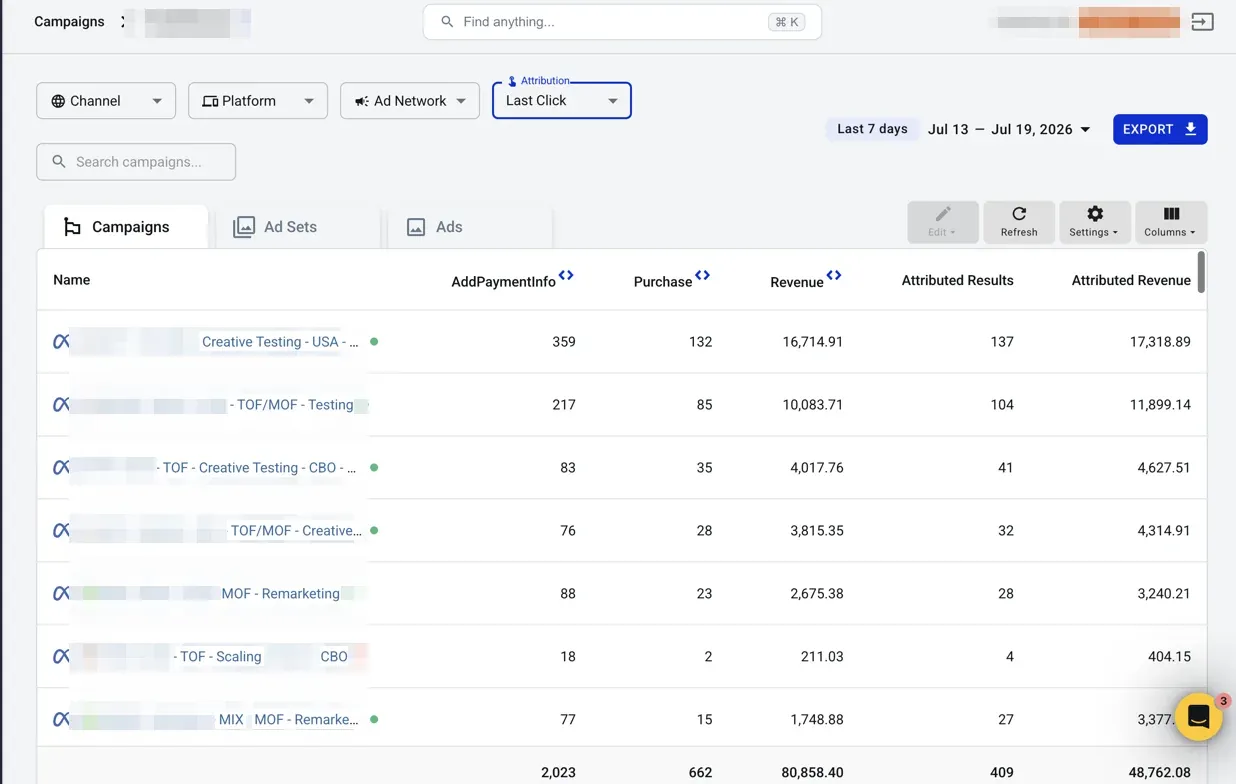
Three things to notice:
- Campaign numbers shift. AnyTrack re-assigns the event columns (
Purchase,Revenue,AddPaymentInfo) campaign by campaign. The TOF/MOF - Testing row drops from 121 purchases to 85. The MIX - MOF - Remarketing row jumps from 6 to 15. - The totals row does not move. Both views read 662 purchases and 80,858.40 in revenue. Each model credits exactly one ad click per conversion. Switching models moves credit between campaigns; it never creates or removes conversions.
- Attributed Results and Attributed Revenue do not move either. These columns are the ad platform’s own figures, under the platform’s own model and window. AnyTrack fetches them from Meta Ads, Google Ads, TikTok Ads, ChatGPT Ads, and Microsoft Ads (Taboola and Outbrain do not sync them). The AnyTrack dropdown has no effect on them. That makes them a fixed benchmark: compare the same platform number with your campaigns under First Click, then under Last Click.
The platform columns hold still, so the report compares the same conversions three ways: First Click, Last Click, and the platform model. In the screenshots, Meta reports 104 purchases on the TOF/MOF - Testing row, between the two AnyTrack views (85 and 121). On the remarketing rows, Meta reports more than Last Click (28 against 23, 27 against 15). Meta’s default window also credits ad views, and AnyTrack credits only ad clicks.
How to Read Your Campaigns
Section titled “How to Read Your Campaigns”Compare the same campaign under both models and read the difference as its role in the funnel:
| If a campaign… | It means… | Judge it with |
|---|---|---|
| Gains under First Click | It opens journeys other campaigns finish. Typical for TOF prospecting and testing. | First Click |
| Gains under Last Click | It closes journeys other campaigns started. Typical for MOF and BOF remarketing. | Last Click |
| Barely moves | It is the only ad its buyers ever clicked. | Either model |
Two rules of thumb:
- Do not pause a TOF campaign on Last Click numbers alone. Check it under First Click first. Your remarketing audiences come from the visitors that TOF campaigns bring to your site. When you pause a TOF campaign, you do more than move credit: you stop refilling the audiences that your MOF and BOF campaigns spend against.
- A campaign that moves against its label tells you something. If a TOF campaign gains under Last Click, it reaches warm audiences in practice. Review its targeting overlap with your remarketing pools.
Which Model Should You Use?
Section titled “Which Model Should You Use?”- Affiliate marketers: start with Last Click. It credits the click closest to the sale.
- eCommerce advertisers: read both. First Click shows whether TOF campaigns fill the funnel. Last Click shows whether remarketing converts it.
- Lead generation advertisers: start with First Click. Leads can close days or weeks after the campaign that introduced them.
- If you want one number: pick one model and use it every time. Check the other model before you pause a campaign.
First Click vs Last Click FAQ
FAQ was last reviewed on 2026-10-05
Why did my campaign numbers change when I switched between First Click and Last Click?
Why are the report totals identical under both attribution models?
Why do Attributed Results stay the same when I switch attribution models?
Does switching the attribution model change the data AnyTrack sends to ad platforms?
Which campaigns gain under First Click and which gain under Last Click?
Should I pause a TOF campaign that looks weak under Last Click?
How AnyTrack click-based attribution works, from UTM collection to the attribution window.
Side-by-side comparison of AnyTrack, Meta Ads Manager, and GA4 attribution.